CoPilot
CoPilot is an AI-powered assistant designed to help users work more confidently and efficiently within AltairAI Cloud. It acts as a supportive collaborator that explains concepts, provides guidance, and assists with platform-related tasks.
CoPilot operates strictly within the permissions, boundaries, and policies of the user and their organization. It responds only when users interact with it and never performs actions outside the user’s explicit intent and authorization.
Introduction
Like other AI assistants, CoPilot is controlled through natural, text-based conversation rather than traditional UI navigation. Users can:
- Ask direct questions,
- Request explanations,
- Ask for help when stuck, and
- Request guidance to perform a specific task.
CoPilot responds within the context of the user’s current platform environment (project):
- Explaining how platform features work,
- Answering questions about projects, data, and workflows,
- Providing step-by-step guidance for common tasks,
- Surfacing relevant platform artifacts and documentation, and
- Suggesting next steps based on the current context.
CoPilot does not perform destructive actions (such as delete operations) and never accesses data outside the user’s tenant or permissions.
User interface
CoPilot is accessible wherever the CoPilot icon is visible. The icon has the shape of a chat bubble, and is typically displayed on the upper right of the page, next to the help icon. Click on the icon to start interacting with CoPilot from supported contexts (currently limited to project contexts).
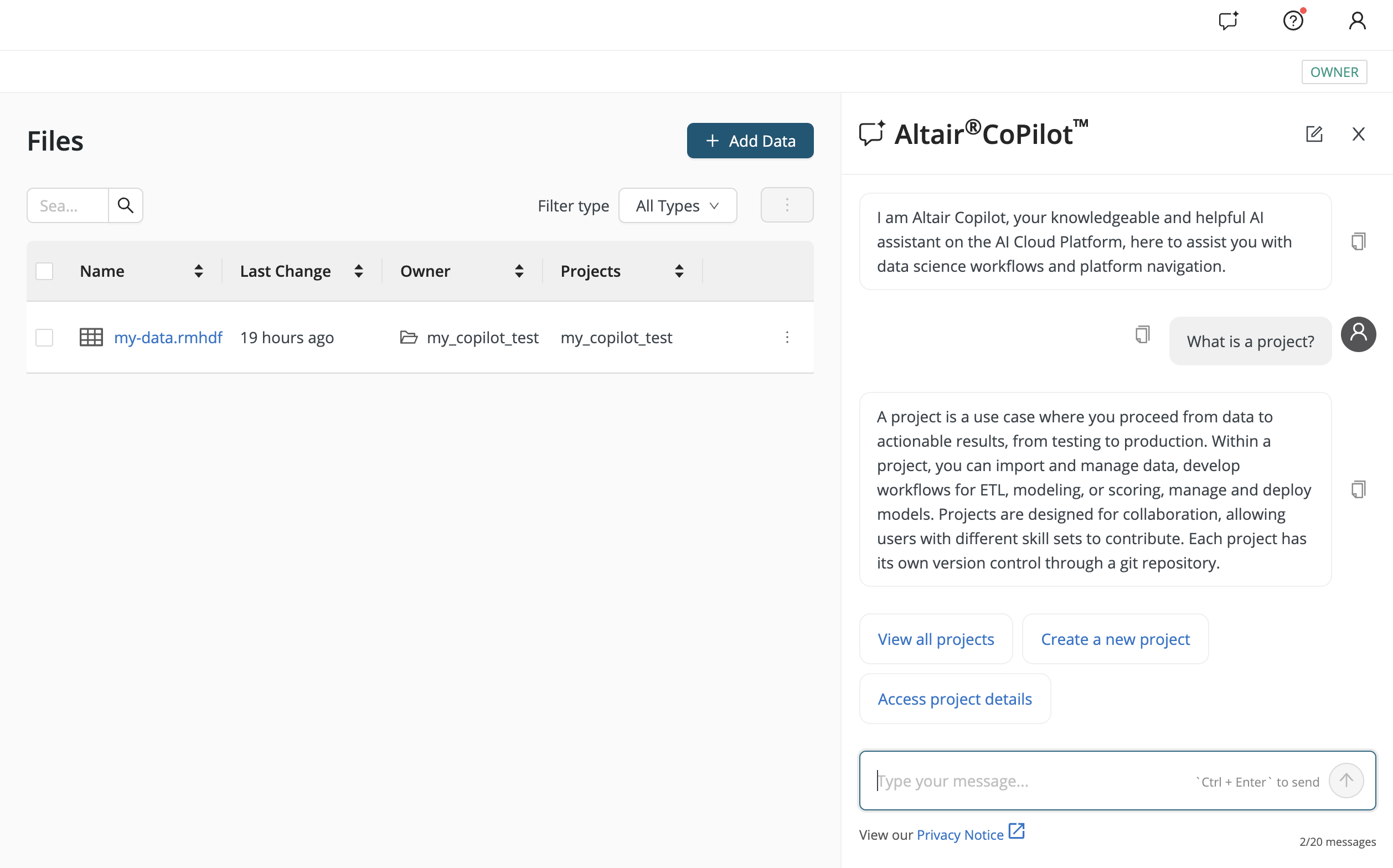
The helpful UI features include:
- Clickable prompt suggestions to help users get started,
- A message counter indicating remaining messages in the current conversation,
- A privacy notice accessible at the start of each conversation or via the footer, and
- Manual controls to start new conversations.
Example use case: Central data health monitoring
For example, consider the case of a data engineer who wants to monitor data freshness, pipeline failures, and sudden drops in data volume across multiple siloed projects.
-
The user explains their goal to CoPilot.
-
CoPilot interprets the intent as central data health monitoring.
-
CoPilot proposes a step-by-step approach, including:
- Creating a new monitoring project,
- Gathering statistics from relevant datasets across projects, and
- Aggregating results into a central table.
-
Each proposed action is explicitly confirmed by the user before execution.
-
The user remains in control throughout the process.
In general, CoPilot is well suited for scenarios such as:
- Learning how platform features work,
- Exploring projects, data, and workflows,
- Understanding data science / machine learning concepts in platform context,
- Troubleshooting issues, and
- Getting guided assistance to complete specific tasks.
Core capabilities
CoPilot clearly separates informational responses from action-oriented operations. This separation ensures safe, predictable behavior and aligns with enterprise governance requirements.
Information and guidance
CoPilot can:
- List projects the user has access to,
- Show information about a specified project,
- Retrieve project contents (folders, files, workflows),
- Load and explain workflows or other artifacts,
- Provide dataset statistics and schema information,
- Explain data science and machine learning (DSML) concepts in platform context, and
- Act as a centralized helpdesk for publicly available documentation.
Navigation assistance
CoPilot helps users discover and navigate to:
- Projects, datasets, and data connections,
- Workflow Studio, Prompt Studio, and Agent Studio entry points,
- Auto AI features (AutoML, Auto Clustering, Auto Feature Engineering, Auto Forecasting),
- Deployments and workloads, and
- Model Registry and model monitoring views.
This reduces the need for manual searching across the platform.
Action-oriented capabilities
Where permitted, CoPilot can perform actions on behalf of the user, including:
- Creating new projects,
- Storing files, workflows, or other artifacts,
- Copying content between projects,
- Sharing projects and inviting collaborators, and
- Creating analytical workflows such as clustering, segmentation, similarity, and distance analysis.
All actions:
- Are executed under the user’s identity,
- Require explicit user confirmation before execution,
- Respect existing permission and access controls, and
- Are fully logged and auditable.
CoPilot is intentionally limited to non-destructive operations. Delete or irreversible actions are not exposed.
Platform scope and context awareness
Tenant-level scope
- CoPilot operates at tenant level from an architectural perspective.
- Access is strictly limited to the user’s tenant and to projects the user is authorized to access.
- Data and context are never shared across tenants.
Project context resolution
When a project context can be reliably identified:
- Users do not need to explicitly specify the project; CoPilot automatically uses the relevant project as context.
- CoPilot can work with other accessible projects if explicitly requested.
If multiple projects are referenced within a conversation, CoPilot may not reliably infer which project the user considers “current.” In such cases, CoPilot may ask for clarification or require the project to be specified explicitly.
AI and architecture
Language model
CoPilot uses GPT-4o as its default out-of-the-box large language model. By default, and according to the service provider’s standard offering, user inputs are not retained or used for model training. Any deviations from this behavior would be governed by contractual agreements with the service provider.
Agent operators
CoPilot is powered by Agent operators, which:
- Interpret user intent and conversational context,
- Determine whether a specialized agent should be invoked, and
- Fall back to conversational assistance when no specialized agent applies.
All operators operate under the same permission, security, and governance model. CoPilot doesn't have elevated privileges beyond those of the requesting user.
Conversation handling and memory
Conversation context window
CoPilot maintains a short-term conversation context of up to 20 messages, which is used as input for generating responses. Once this limit is reached, a new conversation is started. CoPilot does not retain or reference conversation history beyond the active context window.
Session behavior and UI persistence
The same conversation remains active until:
- The message limit is reached, or
- The browser cache is cleared, or
- A new browser tab is opened.
For user convenience, the user interface may temporarily restore recent messages (up to approximately one hour). This UI-level persistence does not extend the model’s conversation context or memory.
For best results, CoPilot should be used in a single browser tab.
Security, privacy, and governance controls
Prompt injection and tool misuse protection
Risk: An attacker attempts to craft prompts that cause the LLM to invoke tools beyond the user’s permissions or with malicious intent.
Mitigations:
- Prompt content and LLM outputs are never executed or embedded natively (e.g. no command-line execution).
- All LLM-triggered tool calls use existing backend REST services and are subject to standard security and access checks.
- Tool calls are authenticated and authorized using the end user’s account; no service accounts are used, preventing privilege escalation.
Privacy and data access control
Risk: Disclosure of sensitive information to unauthorized users.
Mitigations:
- CoPilot accesses only a curated retrieval-augmented generation (RAG) pipeline based on publicly available information (e.g. documentation).
- Access to non-public data is restricted to what the requesting user is already authorized to access.
- Users are responsible for the data they choose to provide to CoPilot.
Excessive agency prevention
Risk: The LLM is granted more capabilities or tools than necessary to perform its task.
Mitigations:
- CoPilot has access only to non-destructive, low-risk tools.
- Tool access is limited to the same REST endpoints available through the standard frontend.
- All actions are executed strictly within the user’s permission scope.
Instruction for tool behavior is provided via the system prompt. Even if this guardrail were to fail, risk is limited because:
- Only GET and CREATE operations are exposed,
- No delete or destructive operations are available, and
- Users can already perform the same actions through the frontend, introducing no new attack vector.
Audit logging and traceability
All CoPilot interactions are logged to support auditing and compliance. Logs include:
- User identity,
- Time and location of the interaction, and
- References to accessed files, sites, or resources.
Availability and tenant governance
CoPilot is available only for tenants where the feature has been explicitly enabled by the service provider.