Retrieval Augmented Generation
Retrieval-Augmented Generation (RAG) is an AI pattern that combines information retrieval with text generation to produce more accurate, contextually relevant, and up-to-date responses. Unlike standard Large Language Models (LLMs) that rely solely on their training data, RAG augments them with an external knowledge source—such as a database, vector store, or document repository—at query time. This ensures responses are grounded in factual, current, and domain-specific information.
Usefulness of RAG
- Improved Accuracy – Reduces hallucinations by grounding outputs in real documents.
- Domain Adaptability – Allows LLMs to work with organization-specific or proprietary knowledge without retraining.
- Freshness – Incorporates recent data without the need to re-train models.
- Explainability – Provides references to source documents for transparency.
- Efficiency – Eliminates the need to fine-tune large models for small updates.
Core Concepts (at a glance)
- Documents & Chunking - Long documents are split into chunks (e.g., 800–1,000 characters with 100–200 overlap) to improve recall and ranking.
- Embeddings - Text is converted to high-dimensional vectors; similar meanings imply nearby vectors.
- Vector Store - A database that stores embeddings and supports fast similarity search.
- Retriever - Given a user query (also embedded), finds the top-k most similar chunks.
- Prompt Construction - Retrieved chunks + instructions form the LLM prompt.
- Generation & Citation - LLM produces an answer and (ideally) references the retrieved sources.
RAG extension in Rapidminer AI Cloud
The RAG Extension brings retrieval directly into your Rapidminer® AI Cloud software workflows. It lets you connect LLM-powered operators to external knowledge with minimal glue code.
Vector Stores
- Supported: Qdrant.
- Connection: Provide host/URL, port, API key, and TLS settings. Save as a reusable Connection in Rapidminer AI Cloud.
Embeddings
- Built-in models: Rapidminer AI Cloud includes pre-built embedding models for common use cases.
- Custom models: You can register custom ONNX embedding models to meet domain or compliance needs.
The RAG extension provides different operators to create a collection, delete a collection, retrieve and insert data from the vector stores.

| Operator | Purpose |
|---|---|
| Create Collection | Create a new collection (index) in Qdrant. |
| Delete Collection | Drop an existing collection. |
| Insert Documents | Upsert vectors + payloads into a collection. |
| Retrieve Documents | Similarity search with configurable top-k and score threshold. |
| Create Embeddings | Convert text columns (and queries) into vector columns. |
Examples
Ingestion workflow
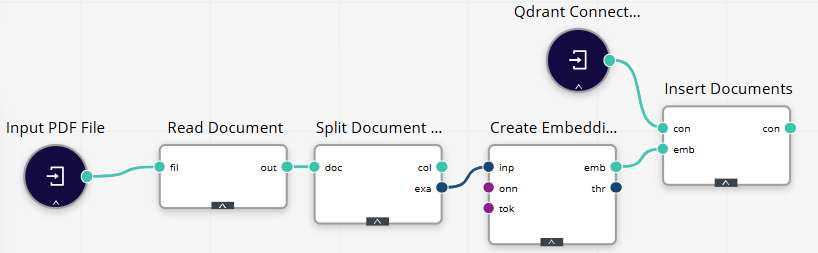
To better understand how to build RAG pipelines, let’s run through an example workflow for inserting the data into a vector store. See the workflow example below:
-
Read source content.
Use Read Document to load a PDF (or other files) → a table/ExampleSet with a text column.
-
Chunk/Split (optional but recommended).
If your document is long, split text into chunks (size ~800–1,000 chars; overlap 100–200).
-
Embed.
Apply Create Embeddings on the text (or chunk) column using your selected embedding model to create an IOObject.
-
Insert.
Use Insert Documents to upsert vectors into the vector store.
Retrieval-and-Generation Workflow
-
Create the query.
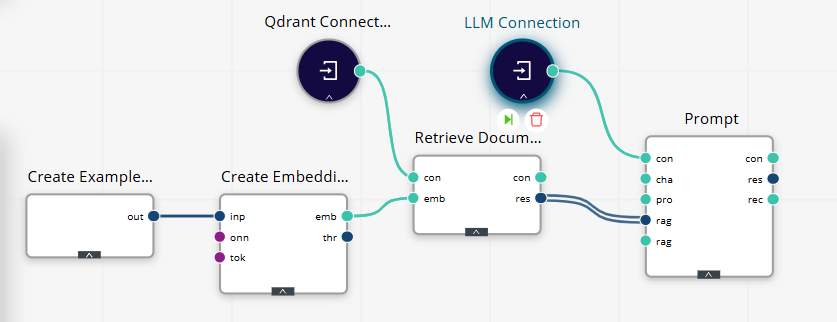
Use Create ExampleSet with a single row/column query (e.g., “Summarize refund policy deadlines.”).
-
Embed the query.
Apply Create Embeddings using the same embedding model as indexing.
-
Retrieve.
Call Retrieve Documents on your collection. Configure the number of results (start with 5–8).
-
Prompt the LLM.
Use Prompt to compose the system/user instructions and inject retrieved chunks.