Python SDK extensions
Overview
By creating a Python SDK extension, developers can make custom Python-based operators available to Rapidminer® AI Studio software and Rapidminer® AI Hub software.
Rapidminer® AI Cloud software now supports the same Python SDK extension packages, so tenant administrators can make Python-based operators available to users in Workflow Studio via the Extension Management user interface.
Once a Python SDK extension is uploaded and reaches Ready status, its operators work like other Workflow Studio operators. Users can
- search for them in the operator list,
- drag them onto the canvas,
- configure their parameters,
- connect them to other operators, and
- run them as part of a workflow.
To learn how to create Python SDK extensions, see the Python SDK documentation.
Availability in Rapidminer AI Cloud
Python SDK extensions are managed at the tenant level. A tenant administrator uploads the extension package via the Extension Management user interface, and Rapidminer AI Cloud verifies the package before making its operators available in Workflow Studio.
For upload and administration steps, see Extension Management.
Example: Python Samples extension
The following example shows a Python SDK extension named Python Samples. The extension was created with the Python SDK, uploaded via Extension Management, and verified by Rapidminer AI Cloud.
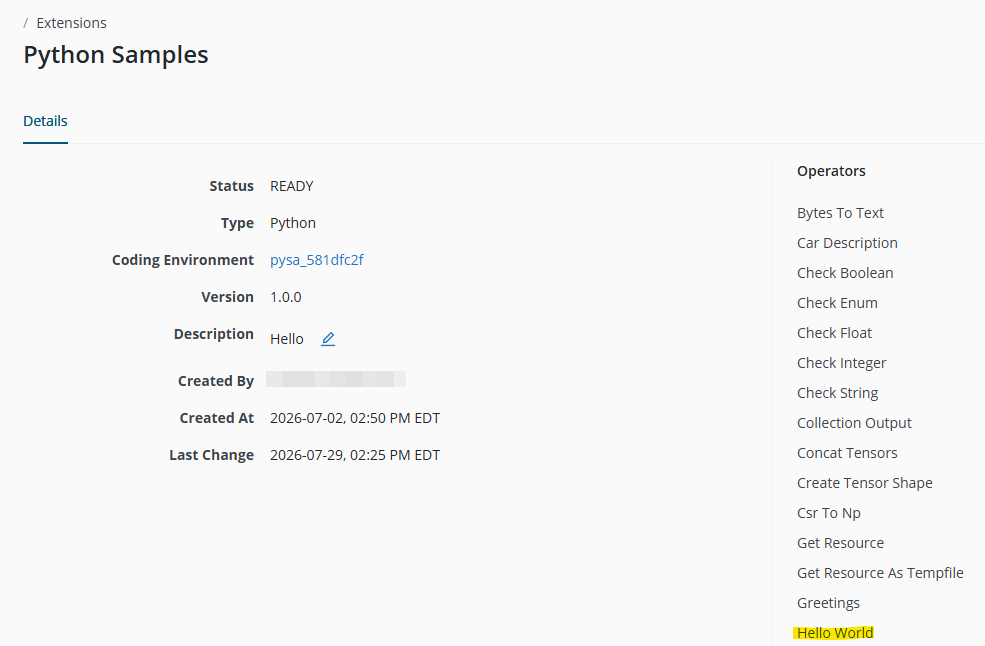
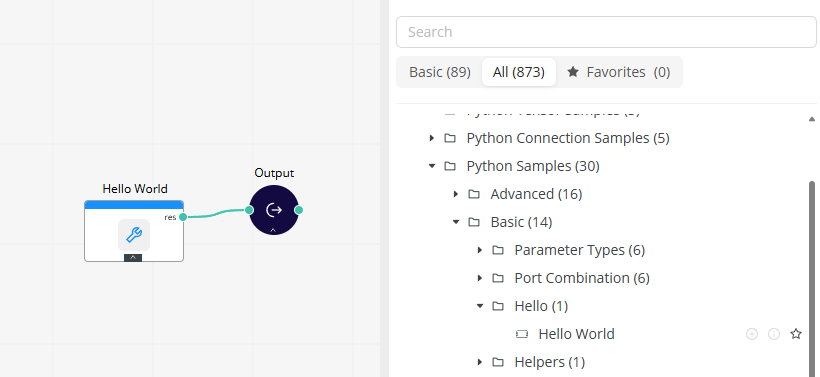
Once the extension is Ready, its operators become visible in Workflow Studio. Users can add these operators to a workflow the same way they add built-in operators.
Tenant Admin
Tenant administrators make Python SDK extensions available in Rapidminer AI Cloud through Extension Management. Administrators should upload the extension package, confirm that it reaches Ready status, and verify that the expected operators are listed on the extension Details page.
For the full upload and management workflow, see Extension Management in Rapidminer AI Cloud.
FAQs
| Question | Answer |
|---|---|
| Why is the extension not visible in Workflow Studio? | The extension may not be in Ready status yet. Ask a tenant administrator to check the extension status in Extension Management. Restart Workflow Studio or create a new Workflow Studio session to see newly available extension operators. |
| Why can't I find an operator from the extension? | The extension package may not include the expected operator, or the wrong package may have been uploaded. Ask a tenant administrator to check the operators listed on the extension Details page. |
| Why does the operator fail to start or run? | The default resource pool may not have enough available vCPU or RAM. Check tenant resource quota and free or request additional capacity. |
Resource note: Python SDK operators request compute resources from the tenant's default resource pool when they run. If an operator does not start, fails during execution, or stays unavailable even though the extension is ready, the tenant may not have enough available quota, such as vCPU or RAM. Reduce other running workloads or request additional capacity before trying again.