Rapidminer Graph Studio
Rapidminer® Graph Studio™ software (formerly Anzo by Cambridge Semantics) is a data discovery and integration platform within Rapidminer that helps organizations build and manage knowledge graphs at scale. It creates a semantic layer over diverse data sources to eliminate silos, supports real-time exploration of massive datasets via the Rapidminer® Graph Lakehouse™ engine, and enables use cases like 360° customer views, supply chain monitoring, fraud detection, and GenAI/RAG applications. Built on open standards (RDF, OWL, SPARQL), it's designed for both data engineers and domain experts to integrate, query, and visualize complex enterprise data relationships.
Read more: Rapidminer Graph Studio.
A Rapidminer Graph Studio connection gives you direct access to your Rapidminer Graph Studio via the operators:
- Query Graph
- Validate SPARQL Query
- Write Additions and Deletions to Graph
- Call Semantic Service
- Insert/Update Statements Based on Statement Templates
- Query Lakehouse
This document will walk you through how to:
Create a connection
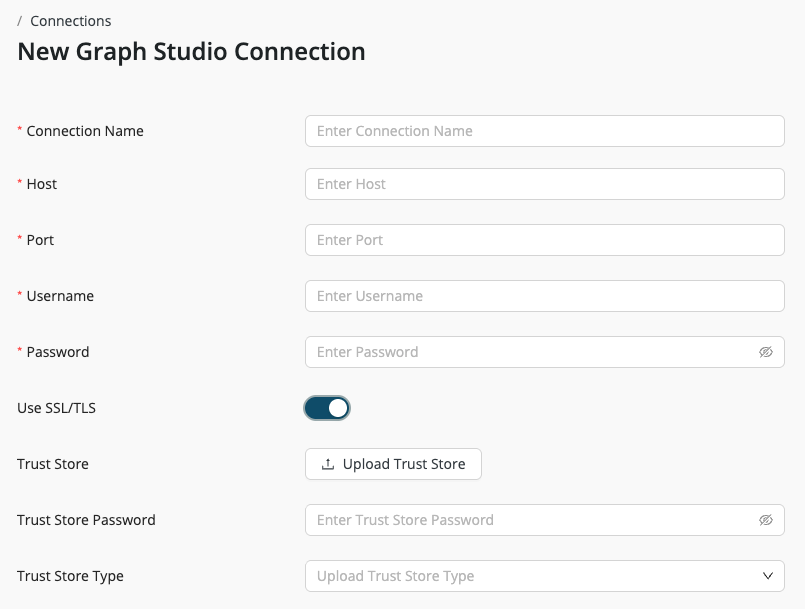
To configure a new connection and connect to your Rapidminer Graph Studio installation, you will need details such as the hostname, port, and some user credentials. Make sure you have them at hand before starting the process.
-
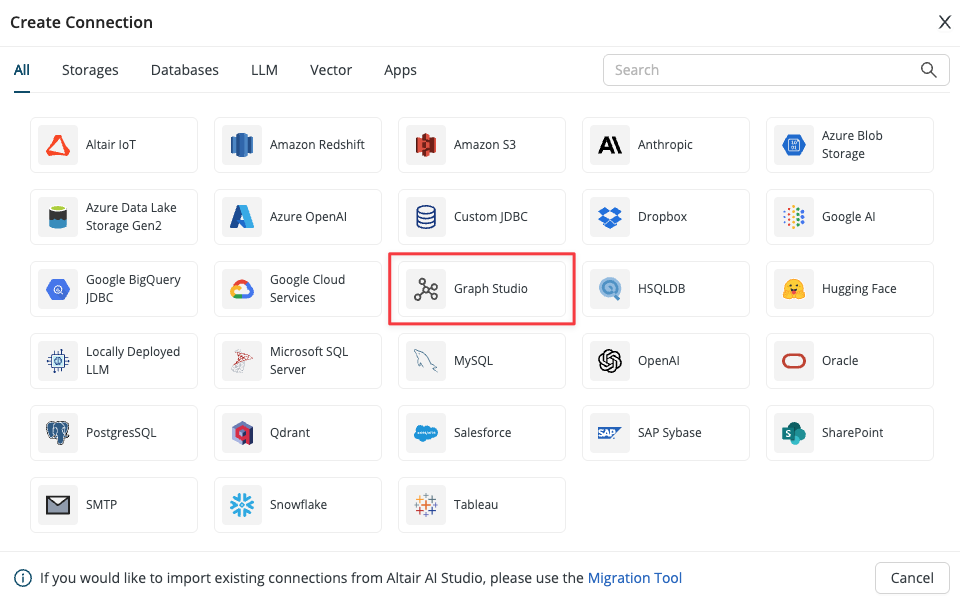
Navigate to the Rapidminer® AI Cloud software Connection screen, create a new connection and select Rapidminer Graph Studio.
-
Give a name to the new connection.
-
Configure the mandatory hostname, port, username and password settings.
-
(optional) Configure a Trust Store if applicable for SSL/TLS.
Use a Rapidminer Graph Studio connection
Query your graph
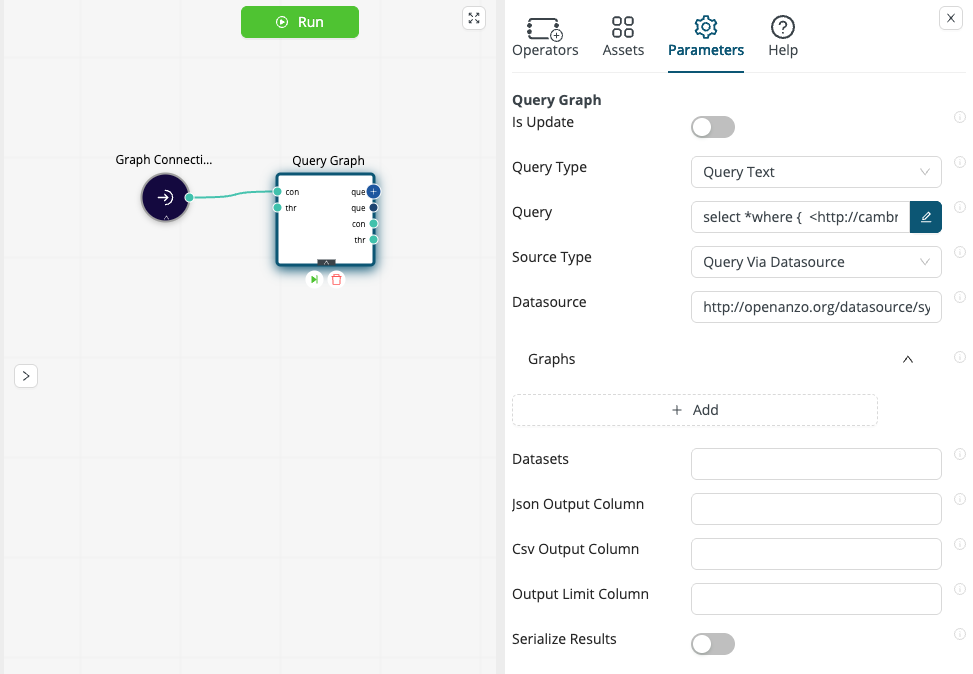
The Query Graph operator allows users to query the graphs in Rapidminer Graph Studio. It's possible to query a datasource, a data set or a graphmart defined in Rapidminer Graph Studio. The SPARQL query can be defined in a text box.
- If querying via datasource, the system journal is queried if none is provided.
- To query via graphmart, retrieve the graphmart URI via the Rapidminer Graph Studio UI. See: Graphmart FAQ
- To query via a dataset, retrieve the Linked Dataset Catalog Entry URI for the Dataset in question via the Rapidminer Graph Studio UI. See: Dataset FAQ
Other operators
The extension also includes other operators that give you different opportunities to interact with the graph. Please refer to the Rapidminer Graph Studio documentation for further information.
Call Semantic Service
This operator calls any of the Sematic services provided by Rapidminer Graph Studio to manage and configure the system.
Validate SPARQL Queries
This operator gets a query as an input, and checks where it's valid for Rapidminer Graph Studio. The output is a table with a "is_valid" column stating the validity and additional columns the the possible exception and other information.
Write Additions and Deletions to Graph
This operator allows users to add or delete statements to an existing datasource.
Insert/Update Statements Based on Statement Templates
This operator allows users to update or insert statements in a datasource based on a template that provides the subject-predicate-object structure.
Query Lakehouse
This operator allows users to directly query the Rapidminer Graph Lakehouse database.