Insights Hub
Siemens Insights Hub is an Internet of Things (IoT) platform-as-a-service (PaaS) that serves as the foundation for digital transformation in the industrial sector. It connects industrial equipment and systems to the cloud, enabling companies to collect, analyze, and transform raw operational data into actionable insights. The platform helps manufacturers and industrial operators improve operational efficiency, optimize equipment performance, reduce unplanned downtime, and enable predictive maintenance through advanced analytics and real-time monitoring capabilities.
Read more: Insights Hub.
An Insights Hub connection gives you direct access to your Insights Hub tenant via the operators::
- Read Insights Hub Time Series
- Export Insights Hub Time Series to Data Lake
- Read Insights Hub Data Lake
- Write Insights Hub Data Lake
This document will walk you through how to:
Create a connection
Before creating an Insights Hub connection, make sure you have:
- Access to a Siemens Insights Hub tenant
- Valid client credentials (Client ID and Client Secret)
- Appropriate permissions for the operations you plan to perform
- Familiarity with your asset structure and aspect definitions
Read more: Insights Hub Token Management
-
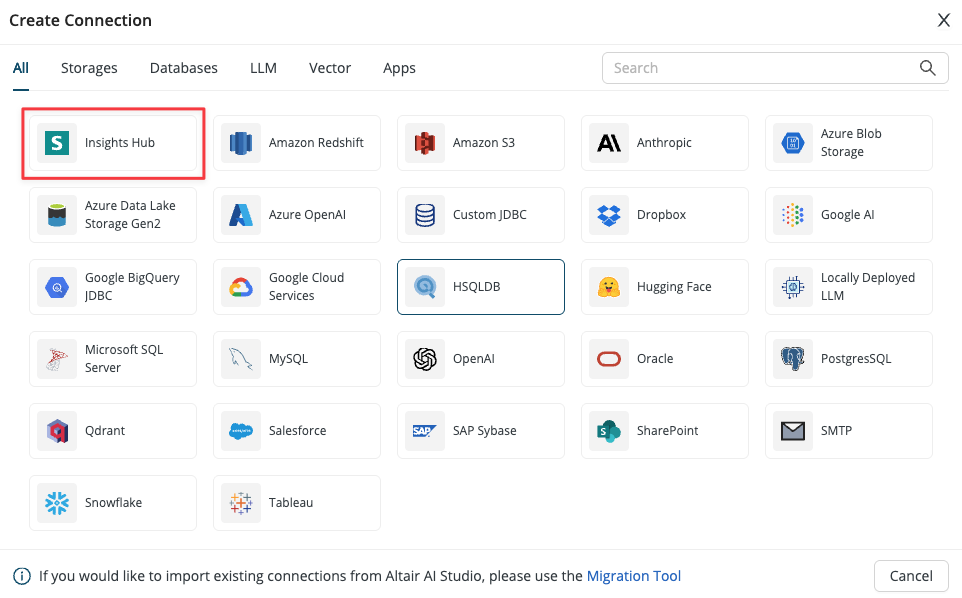
Navigate to the Rapidminer® AI Cloud software Connection screen, create a new connection, and select Insights Hub.
-
Give a name to the new connection.
-
Configure the mandatory Tenant name, Client ID and Client Secret settings.
-
Save the connection.
Use the Insights Hub connection
Read Insights Hub Time Series data
This operator connects to the Siemens Insights Hub platform and retrieves time series data for a given asset (entity) and its associated aspect (property set). The operator supports flexible querying with time range filtering, property selection, sorting, and result limiting. It authenticates using Insights Hub connection credentials and outputs the retrieved data as a Rapidminer table with proper data type mapping based on the asset's aspect definition.
Export Insights Hub Time Series to Data Lake
This operator creates an asynchronous bulk import job that exports time series data from the Siemens Insights Hub platform to the Integrated Data Lake. The operator supports importing data from multiple assets and aspects within a specified time range. The operator creates an import job, polls for its completion status, and returns the resulting data lake file when the job succeeds. The exported data is stored in the specified destination folder in the data lake and can be accessed using the Data Lake Reader operator. This is particularly useful for large-scale data exports and archiving historical time series data for analytics and machine learning workflows.
Read Insights Hub Data Lake
This operator retrieves a single file from the Insights Hub Data Lake using the provided path and the configured Insights Hub connection. The file can either be downloaded to local storage or streamed directly for better performance and memory usage. The resulting file is output as a Rapidminer FileObject, which can be consumed by file-reading operators like Read CSV, Read Excel, and others.
Write Insights Hub Data Lake
This operator uploads a single file to the Insights Hub Data Lake using the provided upload path and the configured Insights Hub connection. The file to upload is provided as a Rapidminer FileObject input, which can be generated by file-reading operators or other file sources.